d

Show the popup text box on cell in Excel 2013

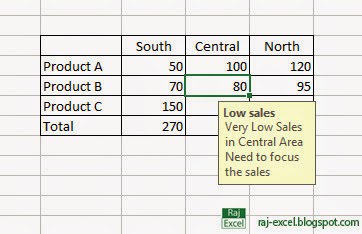
Show the popup text box in cell when you select the cell.


Show the popup text box on cell in Excel 2013
raj-excel.blogspot.com


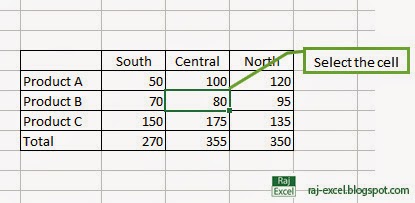
Select the cell you want to appear popup tex box.

Show the popup text box on cell in Excel 2013
raj-excel.blogspot.com

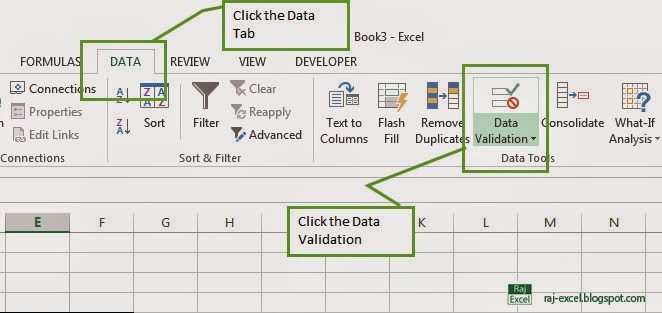
Goto Data tab and click the Data Validation.

Show the popup text box on cell in Excel 2013
raj-excel.blogspot.com

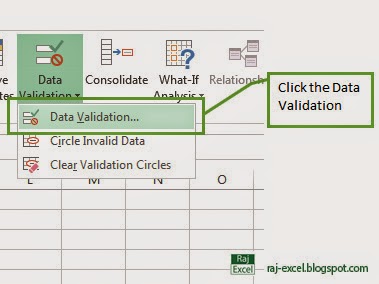
 After the select the Data Validation the drop down tab appear on screen click the Data Validation...

Show the popup text box on cell in Excel 2013
raj-excel.blogspot.com

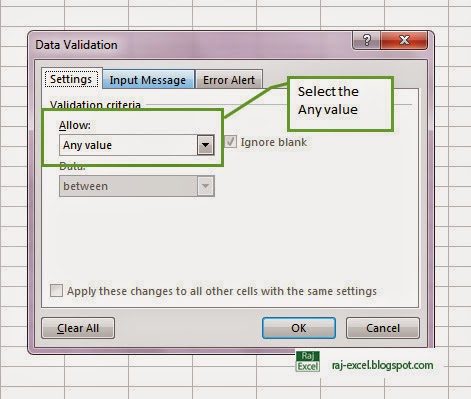
When you click the Data Validation a new dialog box show in screen. In settings tab select the Validation Criteria In Allow drop down box select the Any value.

Show the popup text box on cell in Excel 2013
raj-excel.blogspot.com
 After the selecting of Any value (Don't click the OK button)
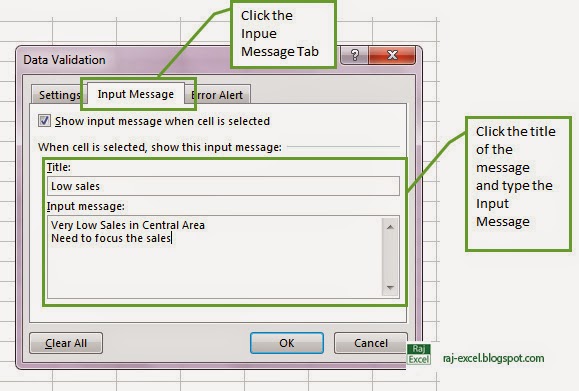
Select the second tab (Input Message) get the check in Show Input message when cell is selected.

and Type the Title of the massage and type your massage in Input Massage box and then click OK.
Show the popup text box on cell in Excel 2013
raj-excel.blogspot.com


Show the popup text box on cell in Excel 2013
raj-excel.blogspot.com

Tips of the Day: Microsoft Excel 2013 Short Cut Keys: Alt + HAF


Microsoft Excel 2013 Short Cut Keys: Alt + H+A+F
Hit the Alt key. Then type HAF (one key at a time).


Open the drop down box for Left-to-Right Text Direction. Set the text direction

Excel 2013 Short Cut Keys: Alt + HAF
raj-excel.blogspot.com

Tips of the Day: Microsoft Excel 2013 Short Cut Keys: Alt + HAC


Microsoft Excel 2013 Short Cut Keys: Alt + H+A+C
Hit the Alt key. Then type HAC (one key at a time).

Align your content to the Center.


Excel Short Cut Keys: Alt + HAC
raj-excel.blogspot.com

Tips of the Day: Microsoft Excel Short Cut Keys: Alt + HAB


Microsoft Excel Short Cut Keys: Alt + H+A+B
Hit the Alt key. Then type HAB (one key at a time).


Align text to bottom.

Microsoft Excel Short Cut Keys: Alt + HAB
raj-excel.blogspot.com

Tips of the Day: Microsoft Excel Short Cut Keys: Alt + H+6


Microsoft Excel Short Cut Keys: Alt + H+6
Hit the Alt key. Then type H6one key at a time).


Move your content farther away from the cell border.

Activity log Tracker Excel 2013 Online Template


Description:
Track your duration and calories burned through your various activities with this log template.

Daily task list Excel 2013 Online Template


Description:

Stay organized with this template list of daily tasks. Important events, special occasions, holidays and have your own list, and every day tasks to do to stay on track. Enter a date in the yellow box to highlight the tasks for that day.


How to make text or data Italic in Excel 2013


First select your text/data you need to Italic


How to make text or data Italic in Excel 2013
raj-excel.blogspot.com


Go to Home Tab>
In the Font group click the Italic icon look like this (for example see the picture below)
Or
Keyboard short: Hit the or  

Italic Icon

How to make text or data Italic in Excel 2013
raj-excel.blogspot.com


and you will see the all the selected text convert to normal font to Italic. (for example see the picture below)


How to make text or data Italic in Excel 2013
raj-excel.blogspot.com


Value


A value can be virtually any type of data of a given type of data, such as a string, a digit, a single letter.
The numerical values ​​represent an amount of some kind: amounts of sales, number of employees, atomic weights, test results, and so on. Values ​​may also be date (as in February-26-2013) or the time (eg, 3:24 a.m.).
To Boolean or logical data, the value refers to the state of the data - whether true or false
For text data, the value refers to a word or string of entry into the spreadsheet
The value can also be used to mean a condition or parameter that must be fulfilled for certain results in a worksheet occur.

For example, to filter data, the value is the condition that the data must meet in order to remain in the data table and not filtered.

Worksheet


spreadsheet is an object in a spreadsheet program that is mainly composed of a grid of cells arranged in rows and columns, which are held spreadsheets and information.
There are three default file sheets in 2010 or earlier versions, but in 2013 only one sheet by default, but you can create many sheet if necessary.
A file stored in a spreadsheet program may consist of many worksheets.

Excel sheet view in 2003
raj-excel.blogspot.com

Excel sheet view in 2010
raj-excel.blogspot.com

Excel sheet view in 2013
raj-excel.blogspot.com

Recommended for You

LinkWithin

Related Posts Plugin for WordPress, Blogger...